
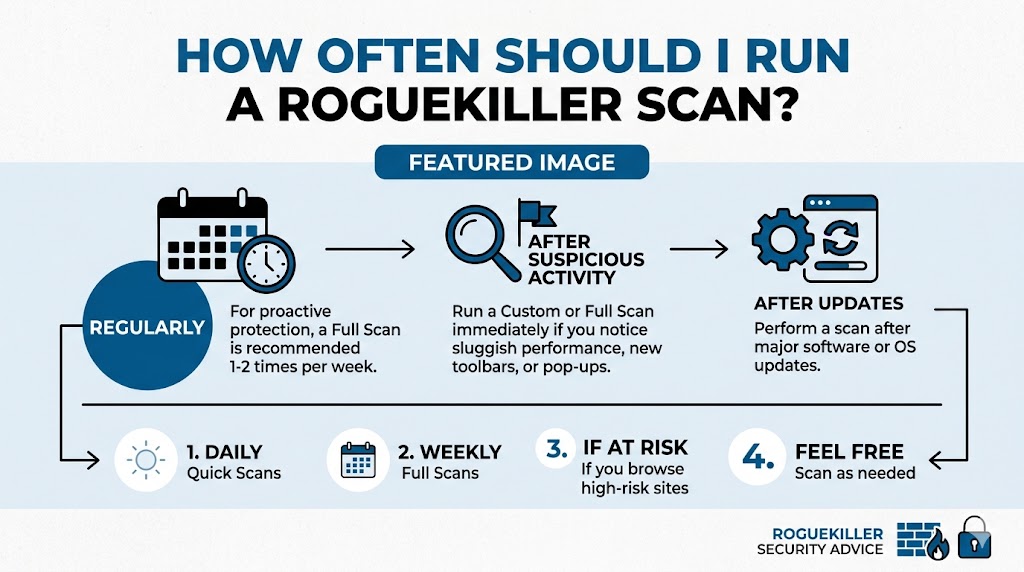
Cyber threats continue to evolve, making regular malware detection an essential part of maintaining a secure computer. RogueKiller is a powerful anti-malware tool designed to detect and remove malware, potentially unwanted programs, rootkits, and other malicious threats that traditional security software may overlook. Many users install RogueKiller but remain unsure about the ideal scanning frequency. Running scans too rarely can leave systems vulnerable, while excessive scanning may consume unnecessary resources. Understanding when and how often to perform a RogueKiller scan can help maintain optimal security without affecting system performance.
Understanding RogueKiller and Its Purpose
What RogueKiller Does
RogueKiller is a specialized malware removal utility that focuses on identifying advanced threats, malicious registry entries, hidden processes, and suspicious system modifications. Unlike standard antivirus programs that provide real-time protection, RogueKiller is often used as an additional layer of security for detecting threats that may bypass primary defenses.
Why Scan Frequency Matters
The effectiveness of any malware scanning tool depends largely on how consistently it is used. Regular scans increase the likelihood of detecting threats before they cause significant damage, steal sensitive data, or compromise system stability.
Recommended Scan Frequency for Most Users
Weekly Scans for Average Home Users
For most home users, running a RogueKiller scan once per week provides a balanced approach to cybersecurity. Weekly scans help identify emerging threats while minimizing resource usage. This schedule is generally sufficient for users who:
- Browse reputable websites
- Download files occasionally
- Maintain an active antivirus solution
- Practice safe online behavior
A weekly scan allows RogueKiller to identify suspicious changes before they become serious security concerns.
Monthly Deep Scans for Low-Risk Users
Users who rarely download software, visit only trusted websites, and maintain strong security practices may choose to run RogueKiller once per month. However, monthly scanning should only be considered if:
- Real-time antivirus protection is active
- Operating systems are updated regularly
- Online activity remains limited to trusted sources
Even low-risk users benefit from periodic scans to detect hidden threats.
Situations That Require More Frequent Scanning
After Downloading New Software
Every software installation introduces potential risk. Even legitimate applications can occasionally include unwanted components or bundled programs. Running a RogueKiller scan after installing software helps verify that no suspicious elements were added to the system.
Following Suspicious System Behavior
Unexpected system behavior often indicates malware activity. If you notice any of the following signs, perform a RogueKiller scan immediately:
- Slow computer performance
- Unusual pop-up advertisements
- Browser redirects
- Unknown startup programs
- Disabled security settings
- Frequent crashes
Early detection can prevent further system compromise.
After Clicking Suspicious Links
Phishing emails, malicious advertisements, and fraudulent websites remain common attack vectors. If you accidentally click a suspicious link, initiate a RogueKiller scan as soon as possible. Immediate scanning helps identify potential infections before they spread throughout the system.
Scan Recommendations for Business Users
Weekly Scans for Small Businesses
Small businesses handle valuable customer information, financial records, and operational data. A weekly RogueKiller scan can strengthen organizational security by identifying threats that may evade standard endpoint protection solutions.
Routine scans reduce the risk of:
Data breaches
Credential theft
Financial fraud
Network infections
Daily Monitoring in High-Risk Environments
Organizations operating in high-risk industries may require more frequent scanning. Daily or every-other-day scans can help protect systems that:
- Process sensitive customer data
- Handle financial transactions
- Manage healthcare information
- Support remote work environments
More frequent scanning improves visibility into emerging threats.
Factors That Influence Scan Frequency
Internet Usage Habits
Individuals who spend significant time online face greater exposure to cyber threats. Frequent browsing, downloading, streaming, and file sharing increase the likelihood of encountering malicious content.
Users with heavy internet activity should consider running RogueKiller scans at least once per week and supplementing them with additional scans when necessary.
Download Activity
The more files you download, the greater the potential risk. Downloads from unknown sources may contain hidden malware, trojans, or potentially unwanted programs.
Frequent downloaders should run RogueKiller scans multiple times per week to maintain stronger protection.
Shared Computer Usage
Computers used by multiple people have a higher chance of exposure to unsafe websites, infected files, or risky applications. Shared systems benefit from increased scan frequency to ensure threats are identified quickly.
Creating an Effective Scanning Routine
Combine RogueKiller With Antivirus Software
RogueKiller works best as part of a layered security strategy. It should complement rather than replace traditional antivirus protection.
An effective routine may include:
- Continuous antivirus protection
- Weekly RogueKiller scans
- Operating system updates
- Browser security enhancements
Regular backups
This multi-layered approach improves overall cybersecurity resilience.
Schedule Scans During Idle Hours
To avoid interruptions, schedule scans during periods of low computer activity. Many users choose evenings, lunch breaks, or overnight hours.
Scheduled scanning offers several benefits:
- Consistent security checks
- Reduced disruption
- Improved compliance with security practices
- Better system management
- Review Scan Results Carefully
Running scans alone is not enough. Users should review RogueKiller findings and investigate suspicious detections. Understanding scan reports helps identify recurring issues and strengthen overall security practices.
Signs You May Need Immediate Scanning
Browser Changes
Unexpected homepage modifications, new toolbars, or altered search engines often indicate malware infection. Immediate scanning can help identify the root cause.
Security Software Issues
If antivirus software becomes disabled or stops updating unexpectedly, malicious software may be interfering with system defenses. A RogueKiller scan should be performed without delay.
Unusual Network Activity
Unexpected internet usage, unknown connections, or abnormal data transfers may indicate malware communicating with external servers. Prompt scanning can help detect hidden threats.
Common Mistakes to Avoid
Scanning Only After Problems Appear
Many users wait until symptoms become obvious before running security scans. Unfortunately, malware often operates silently for extended periods. Preventive scanning provides significantly better protection.
Ignoring Software Updates
Security tools perform best when updated regularly. Ensure RogueKiller receives the latest database and program updates before initiating scans.
Relying on One Security Tool
No single application can detect every threat. Combining RogueKiller with reputable antivirus software creates stronger protection against modern cyber threats.
Best Scan Schedule Based on User Type
Casual Users
- RogueKiller scan once per month
- Additional scans after suspicious activity
- Maintain updated antivirus protection
Regular Home Users
- RogueKiller scan once per week
- Scan after software installations
- Monitor system performance regularly
Power Users
- RogueKiller scan two to three times per week
- Scan after large downloads
- Review reports consistently
Business Users
- Weekly scans at minimum
- Daily scans for high-risk environments
- Integrate with broader cybersecurity policies
Conclusion
For most users, running a RogueKiller scan once per week provides an effective balance between security and performance. Users with higher online activity, frequent downloads, shared computers, or business responsibilities may benefit from more frequent scans. Combining RogueKiller with antivirus protection, software updates, and safe browsing habits creates a stronger defense against malware. A consistent scanning routine helps identify threats early, reduce security risks, and maintain long-term system health and stability.